Every traveller will agree that trip planning can turn into a surprisingly long process. One tab for flights, another for timings, then a few more to compare fares. Before long, a simple booking starts feeling like a mini research project. And when a traveller is planning a last-minute trip, they probably don’t want to spend all that time jumping between tabs.
With Akbar Travels, now in ChatGPT, travelers can search for flights, narrow down choices, and plan their journey simply by chatting. Instead of jumping between tabs and filters, they can keep the entire search moving through a conversation.
But how does it actually work? Here’s a simple guide on how to use Akbar Travels on ChatGPT, from finding the plugin to booking the flight that fits.
TABLE OF CONTENTS
How To Use Akbar Travels On ChatGPT: Step-by-Step
1. Open ChatGPT
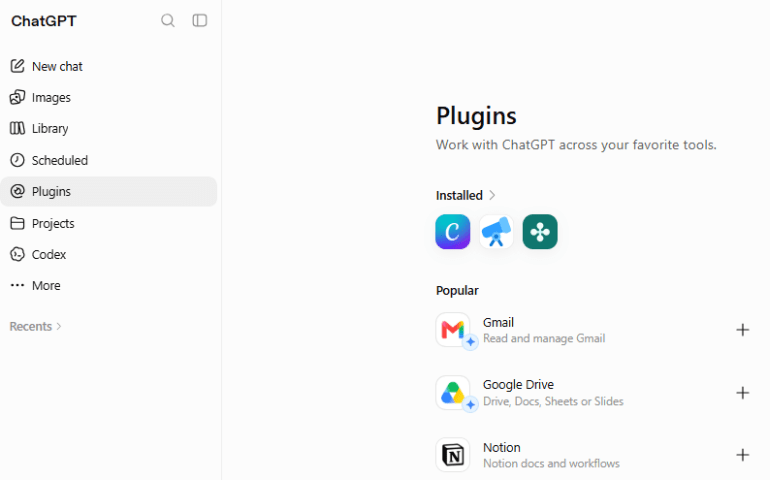
The first step is pretty simple. Open ChatGPT and head to the Plugins section, where available tools can be explored.
If a traveler is browsing a ChatGPT plugins list, this is where Akbar Travels can be found. No complicated setup yet, just open ChatGPT and get started.
Also Read: Akbar Travels On ChatGPT: Chat Your Way To Your Next Trip
2. Search For Akbar Travels
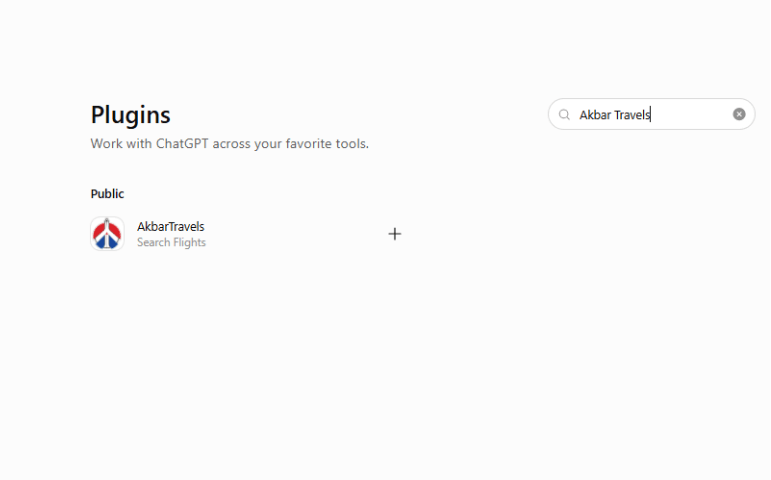
Next, use the search bar and type “Akbar Travels.”
This is the first practical step in how to use Akbar Travels on ChatGPT. Once the relevant option appears, it’s ready for the next step.
3. Select Akbar Travels
Click on the Akbar Travels option to open its information page. This is where travelers can check that they’ve selected the right travel service before moving ahead.
The Chatgpt ingegration is designed to bring flight searching into the conversation, so there’s no need to jump between different screens for every little change.
4. Install The Plugin
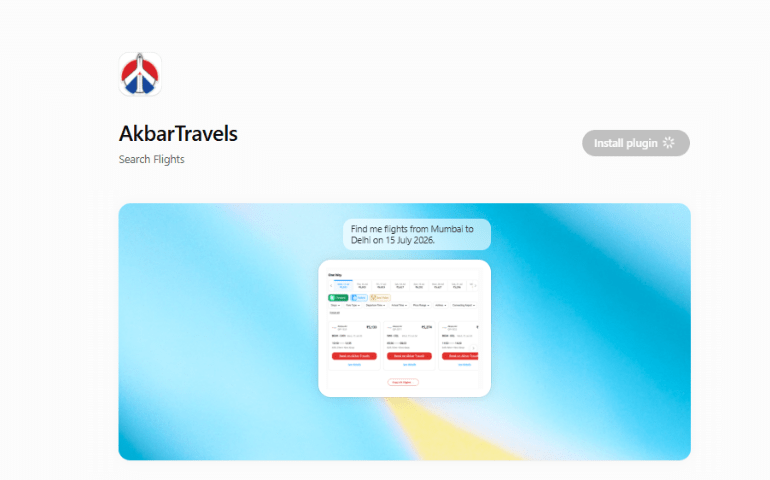
Once on the Akbar Travels page, select Install.
There’s no need to search for a separate ChatGPT plugins download or look for an external file. The installation happens through ChatGPT, keeping the process fairly straightforward.
For anyone figuring out how to use Akbar Travels on ChatGPT, this is basically the setup stage. After this, the actual flight search begins.
5. Start Chatting
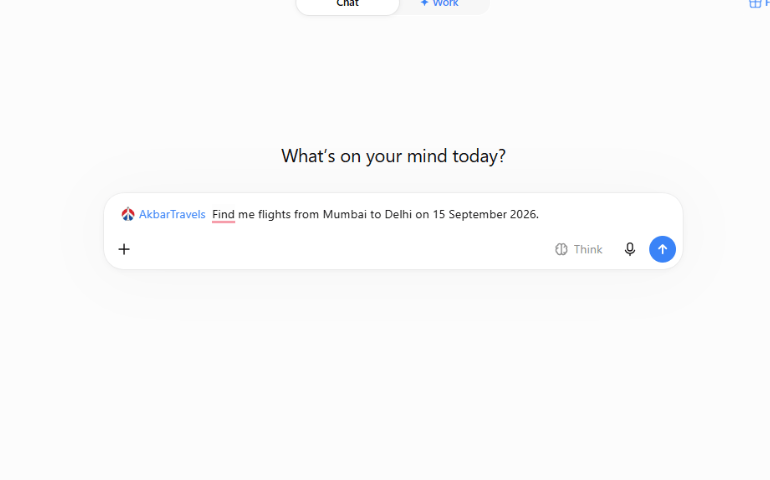
Once the plugin is installed, start a conversation and tell Akbar Travels what kind of flight is needed.
There’s no need to learn special commands or type a perfectly structured search. A traveler can simply explain the trip in normal language.
That’s where Akbar Travels integrates Chatgpt into the travel-planning process, making the search feel more like a conversation than a traditional booking form.
Also Read: Smart International Flight Booking Tips To Save More
6. Ask For A Flight
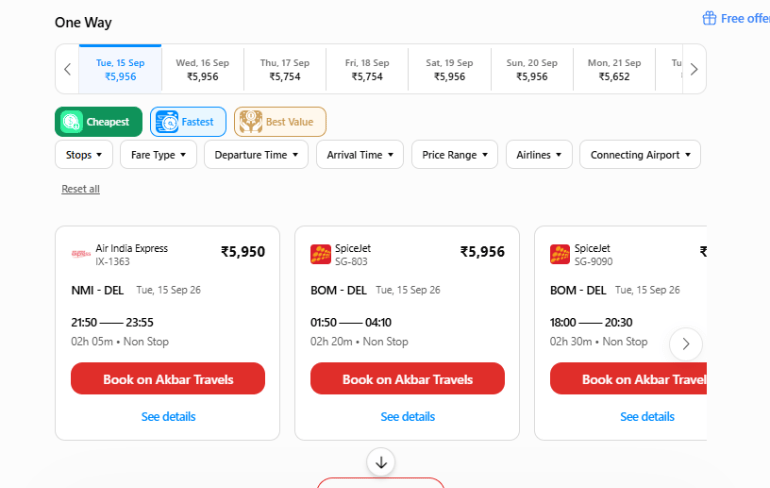
Now, ask for the flight.
For example:
“Get me the cheapest flight from Mumbai to Dubai next Friday.”
Or:
“I want to fly from Delhi to London on 15 Dec morning find me the cheapest flight.”
Mentioning location, trip date, preferred timing, luggage restrictions, or other preferences will help narrow the search.
That is one of the important things to know while learning how to use Akbar Travels on ChatGPT.
7. Explore The Options
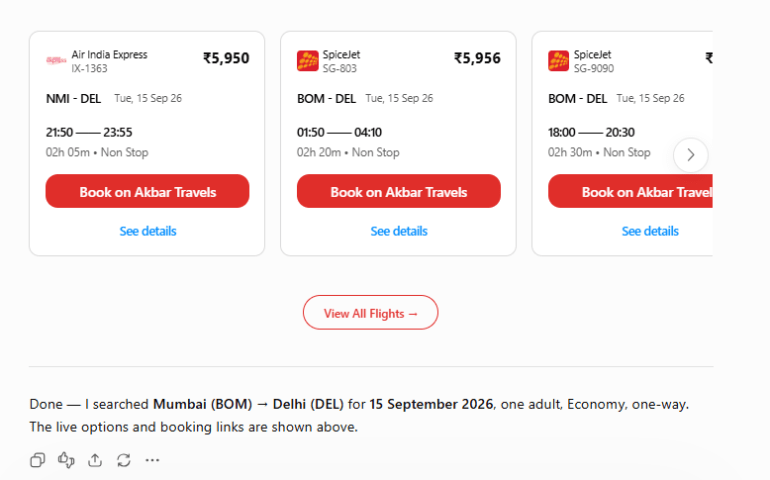
Once the available flights are shown, go through the options and see what fits best.
Akbar Travels is now integrated into ChatGPT for flight booking, giving travelers a way to search for cheap flights without repeatedly hopping between multiple tabs. The conversational Chatgpt plugin for smart trip planning also makes it easier to compare options and adjust the search without starting all over again.
8. Ask Follow-Up Questions
This is probably where the conversational approach becomes most useful.
If the first results aren’t quite right, just ask another question.
“Show me only non-stop flights.”
“Can you find a cheaper option?”
“Are there any morning flights?”
There’s no need to go back and enter everything again. Keep refining the request until the options look right. That’s another useful part of how to use Akbar Travels on ChatGPT.
Also Read: How To Use Akbar Travels Inside ChatGPT For Travel Booking
9. Book When You’re Ready
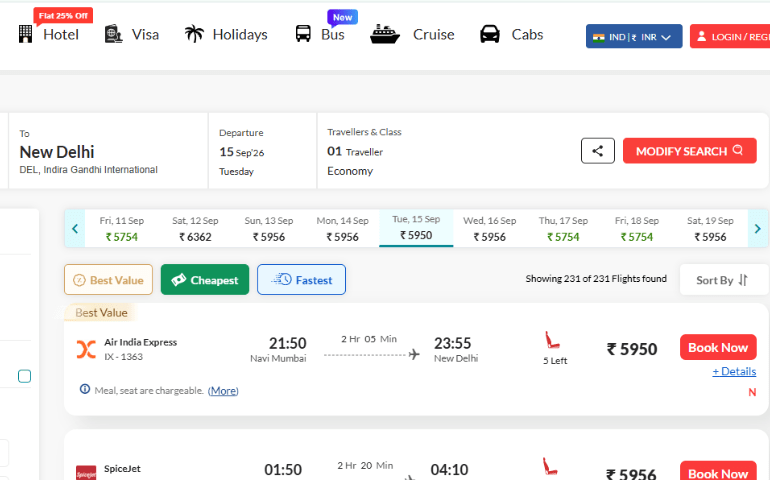
Once the right flight has been found, the traveler can move ahead with the booking.
The whole process follows a simple flow: open ChatGPT, search for Akbar Travels, install it, ask for a flight, explore the results, and refine the search whenever needed.
For travelers wondering how to connect Akbar Travels with ChatGPT, that’s really the process in a nutshell.
A Simpler Way To Plan Flights
Flight planning doesn’t always have to involve endless tabs and repeated searches. Now that Akbar Travels is on ChatGPT to plan your trip, travelers can explain what they need and continue the conversation as their preferences change. This makes flight searching feel more natural, while still giving travelers a familiar platform for their booking needs. If you already use apps for tracking flight prices and getting discounts, this plugin gives you another easy way to keep track of fares and find the best deals. And once you know how to use Akbar Travels on ChatGPT, the process can feel a lot less like searching and a lot more like simply talking through your trip.
Planning your next flight with Akbar Travels x ChatGPT? Tell us what you’d ask it first!
Frequently Asked Questions: How To Use Akbar Travels On ChatGPT
How to access Akbar Travels plugin on ChatGPT?
You may find Akbar Travels on ChatGPT by installing our official plugin from the plugin shop of ChatGPT. Once installed, you can just say “Akbar Travels” in your chat and begin your flight search.
Is Akbar Travels on ChatGPT available 24/7?
Yes, the plugin is enabled in ChatGPT 24/7 so you can browse for flights whenever you want. Our workforce is also on hand 24/7 for customer support or booking help.
Will this plugin allows me to book a flight from directly from ChatGPT?
No, the plugin helps you search and shortlist the flights but you actually book on the Akbar Travels website or app. This protects your payment and personal information safe.
Can you search for abroad flights or is this limited to domestic travel?
The plugin allows you to search domestic and international flights. Simply send us your route and dates and we will show you the best options available.
Does the plugin support round trip or multi-city flight search?
Yes, the plugin supports round-trip, one-way, and multi-city flight searches. During the chat, just tell us your entire schedule and we will offer you accurate results.
Is the Akbar Travels plugin free to use?
Yes the plugin is completely free to install and use for flight searches. Your plan may be subject to ordinary ChatGPT plugin access rules.
Do I need an Akbar Travels account to use the plugin?
With the plugin, you may search for flights without needing an account. You just need to log in or establish an account when you wish to book.
Does the plugin function with the free ChatGPT version?
Yes, but only if your free ChatGPT account has plugin access enabled in settings.
You May Also Like:
International Travel in September: Why It’s The Best Time
Best International Places To Visit In September Within Rs 50,000
Direct International Flights from India: Where Can You Fly Non-Stop
Akbar Travels Services
Best Flight Deals
Mumbai to Delhi Flight Tickets | Mumbai to Bangalore Flight Tickets | Kolkata to Mumbai Flight Tickets | Kochi to Abu Dhabi Flight Tickets | Lucknow to Riyadh Flight Tickets | Delhi to Ahmedabad Flight Tickets
Domestic Flights
Pune to Bangalore Flights | Chennai to Delhi Flights | Bangalore to Chennai Flights | Mumbai to Delhi Flights | Bangalore to Hyderabad Flights | Ahmedabad to Goa Flights | Mumbai to Kolkata Flights | Hyderabad to Delhi Flights | Bangalore to Goa Flights | Mumbai to Goa Flights
International Flights
International Flights Booking | Delhi to Dubai Flights | Delhi to Bangkok Flights | Delhi to Toronto Flights | Mumbai to Dubai Flights | Delhi to Singapore Flights | Delhi to London Flights | Delhi to Kathmandu Flights | Mumbai to London Flights | Chennai to Singapore Flights | Mumbai to Singapore Flights | Delhi to New York Flights | Kolkata to Bangkok Flights
Best Hotel Deals
Hotels In Dubai | Hotels In Mumbai India | Hotels In Pune India | Hotels In Singapore | Hotels In Kochi India | Hotels In Munnar India | Hotels In Bangkok Thailand | Hotels In Kuala Lumpur Malaysia | Hotels In Mecca Saudi Arabia | Hotels In Mahabalipuram India
Apply Visa Online
Dubai Visa Online | 14 days Dubai Visa | 30 days Dubai Visa | 60 days Dubai Visa | Dubai Transit Visa | UAE Visa | Singapore Visa | Malaysia Visa | Thailand Visa | Sri Lanka Visa | US Visa | UK Visa | Schengen Visa | Canada Visa | Australia Visa | New Zealand Visa | France Visa | Italy Visa | Turkey Visa Online | Philippines Visa | Cambodia Visa Online | Vietnam Visa Online | Oman Visa
International Tour Packages
Dubai Tour Packages | Singapore Tour Packages | Thailand Tour Packages | Malaysia Tour Packages | Sri Lanka Tour Packages | US Tour Packages | United Kingdom Tour Packages | South Africa Tour Packages | Europe Tour Packages | Bali Tour Packages | Mauritius Tour Packages | Maldives Tour Packages | Cordelia Cruise Packages |
Domestic Tour Packages
India Tour Packages | Goa Tour Packages | Kerala Tour Packages | Leh Ladakh Tour Packages | Himachal Tour Packages | Andaman Tour Packages | Rajasthan Tour Packages | Uttarakhand Tour Packages | Jammu and Kashmir Tour Packages
Packages by Themes
Honeymoon Packages | Adventure Packages | Visa on Arrival Packages | Family Packages | Romantic Packages | Weekend Getaways Packages